BHuman Lifetime Deal
BHuman Lifetime Deal is an AI-powered video platform that enables the creation of numerous personalized videos with a realistic appearance and feel. Alternative to Vidyard.

Turn recorded speech into captioned, branded short videos ready to share across social channels
Disclosure: We may earn an affiliate commission at no extra cost to you. Deal terms can change, so the current AppSumo listing is authoritative.
A recurring captioning or video-editing subscription is the bill this could replace. AppSumo compares CaptionBolt’s $29 Starter lifetime price with a $468 retail price. For an annual savings estimate, use what your current subscription actually costs over twelve months.
The case for switching is practical. You already have recorded footage, but captions, resizing, branding, and post copy still stand between that footage and publication. CaptionBolt brings those finishing tasks into one workflow. Whether it cancels a subscription depends on how much of your current editor you use beyond those tasks, and whether its processing limits cover your workload.
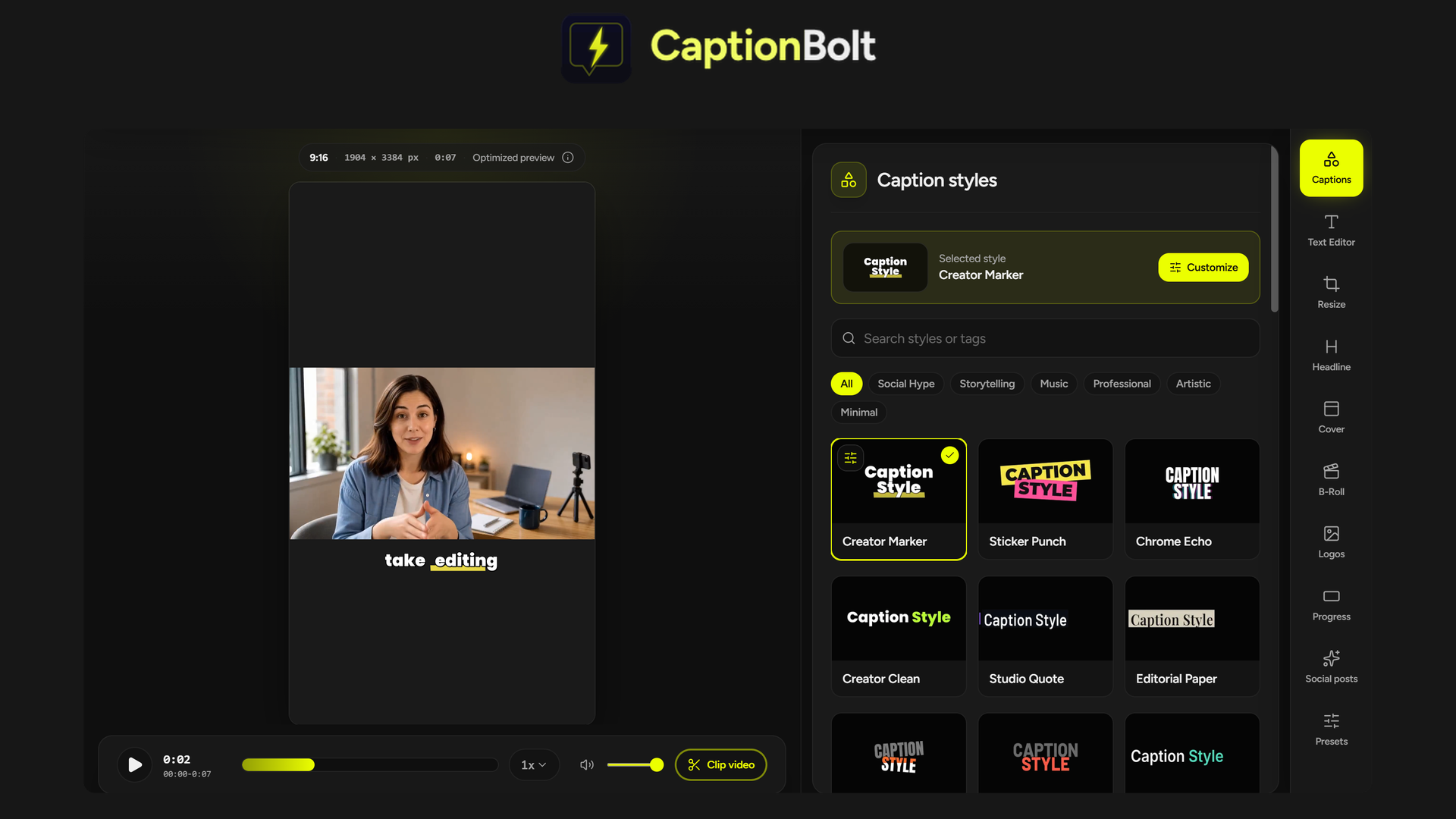
CaptionBolt turns speech in uploaded videos into editable captions. You choose a caption style, correct the wording, and adjust the presentation before exporting.
It also handles common finishing work for short-form content. You can change aspect ratios, add B-roll, create a cover, apply branding, and draft accompanying social posts from the transcript.
That makes it relevant to creators and small teams working with footage they have already recorded. Within the broader media tools category, its focus is getting those videos ready for social publishing without learning a full video editor.
One-time prices: Starter $29, Pro $119, Max $219.
Access: Lifetime access on all three tiers.
Listed alternatives: Descript and Kapwing.
Refund window: Refundable up to 60 days.
Tier structure: Three directly selectable plans with different processing, upload, concurrency, and export limits.
Integration: Pexels.
Vendor: Founded October 15, 2023; based in Hong Kong; bootstrapped; team size of 1–10.
Starter costs $29 against the listing’s $468 retail comparison. That is a low upfront commitment, but the useful payback comes from cancelling an expense you already have.
If CaptionBolt fully replaces your paid captioning workflow, the entry price makes a quick payback plausible. If you keep your existing subscription for other editing work, this becomes an additional expense. The lifetime deal versus subscription comparison is most useful when you separate those two situations.
Generate captions from speech and choose from 338 styles. Adjust fonts, colors, motion, and highlighted words, then correct names or terminology in the Text Editor without changing the audio. This addresses the cleanup work that remains after automatic transcription.
Switch between 9:16, 1:1, 4:5, and 16:9. Fit footage using a crop, blurred background, or solid color, and review caption placement in the preview. All tiers include MP4 exports up to 4K without watermarks.
Choose from 24 editable cover designs and edit the opening text. Add B-roll from suggestions, Pexels, or your own uploads, then adjust its timing. Logos, progress bars, and saved presets help keep recurring content visually consistent.
Draft posts for TikTok, Instagram Reels, and YouTube Shorts. Choose a writing style, then edit the wording, hashtags, and YouTube title or description. This reduces the work of writing accompanying copy from scratch, while leaving the final wording under your control.
Pro adds SRT and ASS exports alongside MP4 and TXT. Max adds VTT, plus a REST API, webhook, and MCP server for AI agents. These differences matter if you need separate subtitle files or want captioning connected to an automated workflow.
The deal uses direct tier selection. Choose Starter, Pro, or Max; a buy-entry-and-stack-later approach does not apply to this listing’s plan structure. Our guide to AppSumo codes and stacking explains that distinction.
Every tier includes the full editor, all 338 caption styles, 4K exports, and no watermarks.
The limits rise unevenly. Pro increases monthly minutes substantially, while doubling Starter’s video-length limit and concurrency. Max triples Pro’s monthly minutes, doubles its video-length limit, and adds one concurrent job.
Monthly capacity still matters. Lifetime access does not mean unlimited processing. Starter’s 60 minutes can bind quickly if you publish frequently.
Export requirements can determine the tier. Separate SRT and ASS subtitle files require Pro or Max. VTT requires Max.
Automation requires the highest tier. The API, webhook, and MCP server are Max features. A low-volume user who needs automation still faces the $219 purchase price.
Use these tool-specific checks alongside the broader lifetime deal verification checklist:
CaptionBolt is a sensible purchase for a defined short-video workflow. Starter is attractive when five-minute clips and 60 monthly processing minutes are enough. Pro is the stronger choice when you need separate subtitle files or substantially more capacity.
Max earns its place through automation, VTT exports, larger uploads, and higher throughput. Choose it for those requirements rather than simply buying the biggest plan. The vendor is a small, bootstrapped company, so keep the purchase tied to work you can use it for now.
Activate your purchase promptly after buying. Set a second decision date for day fifty, leaving time within the 60-day refund window to evaluate actual results. The AppSumo refund policy guide provides additional context.
SAASTOOLY Rating: 4.5/5
Not sure yet? Run this deal through our free scorecard. Seven checks, a payback calculator, and a plain verdict on whether to buy. Get the Lifetime Deal Scorecard, free
Yes. Starter, Pro, and Max each include lifetime access at their respective one-time prices.
Yes. All three tiers include 4K exports, no watermarks, the full editor, and all 338 caption styles.
Pro exports SRT and ASS files. Max includes both formats and adds VTT. Starter exports MP4 and TXT.
Yes. The Text Editor lets you fix names and terms without changing the audio. You can also adjust caption fonts, colors, motion, and highlighted words.
Max includes the REST API, webhook, and MCP server for AI agents. These automation options are available in Tier 3.
The purchase is refundable up to 60 days. The listing also states that AppSumo Plus members are covered by the We Got Your Back guarantee.