About
Vois Studio Lifetime Deal allows users to create unlimited offline voiceovers with 100+ voices across 23 languages, featuring a multi-track timeline and one-click mastering.
Vois Studio lifetime deal review
AI voiceover tools can become annoying when the bill follows every revision. A script is rarely finished in one pass. You change a sentence, fix a pronunciation, adjust a pause, try another voice, or rerender a chapter. If your current voiceover tool charges by credits, words, minutes, or usage, normal production work can turn into a recurring cost.
Vois Studio is listed with a one-time starting price of $59, compared with a stated retail value of $192. That makes the deal interesting for creators who already produce voiceovers often enough to notice the bill. The pitch is simple: generate unlimited voiceovers locally, without a meter running in the background.
What it is
Vois Studio is a desktop voiceover production app for Mac and Windows. It turns written scripts into spoken audio using local voice engines, with 100+ voices and support for 23 languages listed on the deal page.
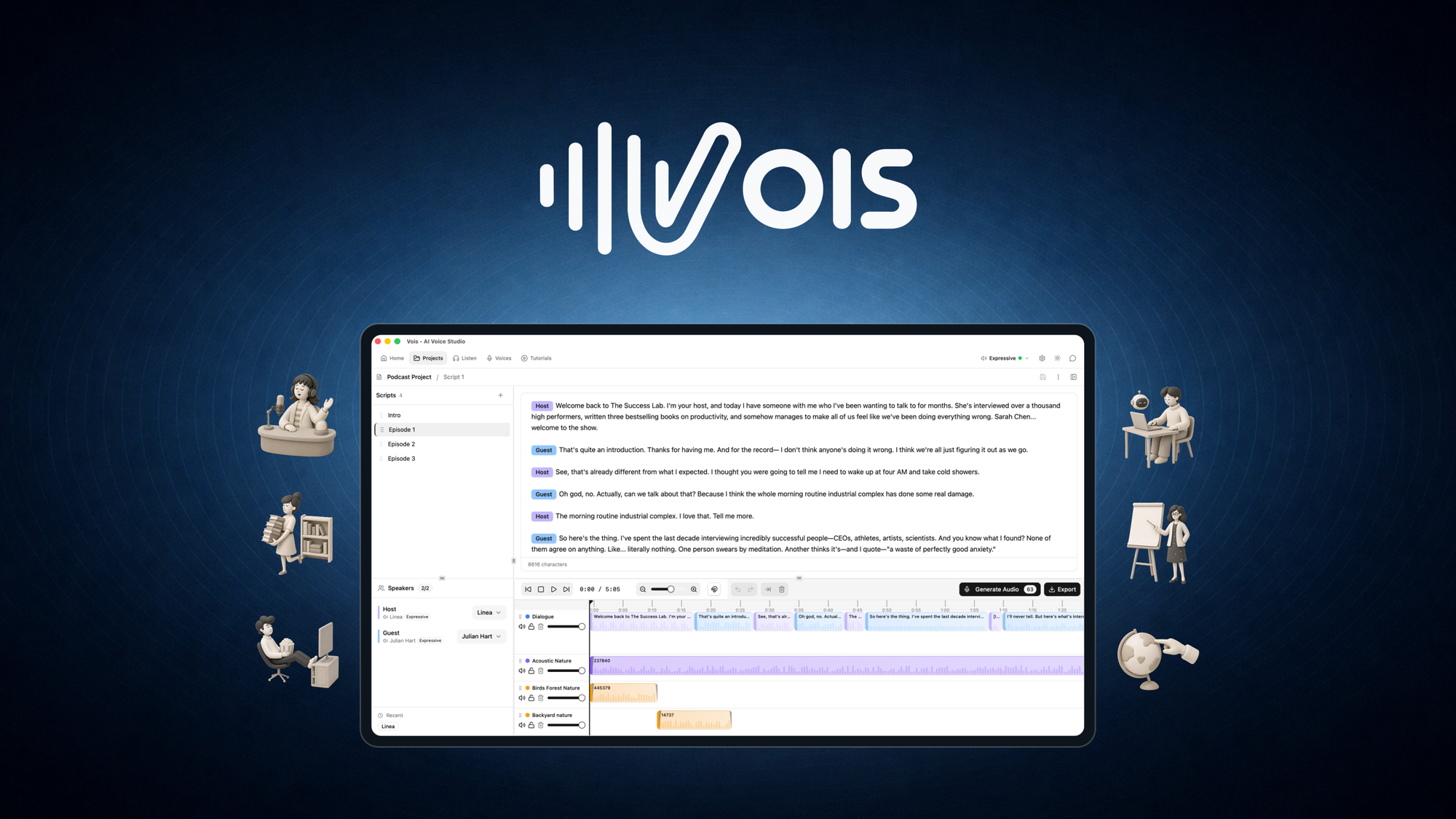
It is not only a text-to-speech box. The app includes a multi-track timeline, multi-speaker scripts, inline vocal reactions, music and sound effects, mastering tools, and export presets for publishing platforms. The workflow is closer to writing, casting, mixing, mastering, and exporting in one place.
The listing says Vois Studio runs locally after the required models are downloaded. That means generation happens on your own machine rather than through cloud processing or uploads. For authors, course creators, podcasters, tutorial makers, and video creators, that is the main difference from many subscription voiceover tools.
If you are comparing this kind of purchase with a monthly subscription, our guide to /blog/lifetime-deal-vs-subscription/ gives the broader framework.
Key facts
One-time price: License Tier 1 starts at $59.
Retail comparison shown on the listing: $192.
Deal type: Lifetime access.
Refund window: Refundable up to 60 days.
Alternative named in the listing: Speechelo.
Best for: Authors, course creators, and podcasters.
Platform support mentioned by the founder: Apple Silicon Macs and Windows x64.
Voices: 100+ voices listed, with 106 core voices shown in the tier feature list.
Languages: 23 languages.
Local generation: Unlimited local generation is included.
Voice engines: 3 local voice engines.
Integrations listed: Google Gemini, Claude, ChatGPT, and Cursor.
Tier structure: Direct tier selection across License Tier 1, License Tier 2, and License Tier 3.
Code stacking: The listing shows direct tier selection, not code stacking.
Commercial usage license: Included in the listed plan features.
If you are new to this type of purchase, /blog/what-is-a-saas-lifetime-deal/ explains why the upfront price can be attractive, and why the terms matter more than the headline discount.
What the payback looks like
The AppSumo listing shows Tier 1 at $59 against a stated retail value of $192. On that comparison alone, the entry tier pays for itself as soon as you would have otherwise paid the listed retail price for similar access.
The stronger payback case is for people replacing a metered voiceover subscription. If you generate voiceovers weekly, test multiple takes, and revise scripts often, unlimited local generation can remove the recurring cost that comes from normal editing. Under six months is excellent for a tool that replaces a regular production bill, and Vois Studio can fall into that category if voiceover work is already part of your weekly output.
If you only need the occasional short narration, the payback is less urgent. In that case, the decision is more about local generation, privacy, and convenience than saving a large monthly spend.
What you actually get
Local generation without a usage meter
The main reason to consider Vois Studio is unlimited local generation. The listing says voiceovers are generated on your Mac or Windows machine without cloud processing or uploads, once the models are downloaded.
That matters for two reasons. First, repeated revisions do not create another usage charge. Second, unreleased scripts and audio can stay on your device. For course drafts, client scripts, books, internal training, and pre-release content, that local workflow may be the reason to buy.
A voice library for different content types
Vois Studio includes 100+ voices across 23 languages. The listing also mentions 21 voice categories, including announcers, narrators, audiobook readers, and app assistants.
That range matters if you publish more than one type of content. A podcast intro, audiobook chapter, tutorial, and app walkthrough often need different delivery styles. Instead of paying for a tool every time you need a different voice, Vois Studio gives you a local library to work from.
Multi-speaker scripts and vocal direction
The app supports multi-speaker scripts, with speaker tags that assign a voice to each character. It also supports inline vocal tags such as laugh, sigh, and gasp, where the voice performs the sound instead of reading the word.
This is useful for audiobooks, training scenarios, roleplay scripts, game narration, and podcast-style content. It also reduces the mess of managing separate files for each character or speaker.
Timeline production with music and sound effects
Vois Studio includes a multi-track timeline and a built-in library of 500+ royalty-free tracks. The listing says that includes 276 music tracks and sound effects, with SFX on their own timeline tracks.
This is the difference between generating speech and finishing a piece of audio. If you currently create a voice clip in one tool, then move it to another editor for music, timing, and polish, this could reduce the number of steps in your workflow.
Built-in mastering and export presets
The listing includes LUFS normalization, de-essing, and limiting. It also mentions one-click export presets for YouTube, Spotify, Apple Podcasts, and ACX technical-audio requirements.
That helps if you publish to platforms with loudness expectations. You still need to check finished audio against your destination’s current requirements, as the listing itself advises, but having presets and mastering tools in the app makes the workflow more practical.
Project organization and section rerendering
Vois Studio can organize full projects chapter by chapter and rerender any section without starting the whole thing over.
That matters most for long-form work. Audiobooks, courses, and long tutorials often need small edits after the first render. If you can fix one chapter or section instead of rebuilding the full project, you save time and avoid unnecessary rework.
Tiers and limits
Vois Studio uses direct tier selection. This is not presented as a code-stacking deal, so the usual advice to buy the entry tier and stack later does not apply.
License Tier 1: $59 lifetime access. Includes 1 device and 0 cloned voices.
License Tier 2: $119 lifetime access. Includes 2 devices and 5 cloned voices.
License Tier 3: $239 lifetime access. Includes 5 devices and 15 cloned voices.
Across the listed plan features, the deal includes the 100+ voice library, an additional 100+ voice pack, full Vois CLI, commercial usage license, unlimited local generation, 3 local voice engines, 106 core voices, 23 languages, multi-speaker script editor, inline vocal reactions, and pronunciation dictionary.
The main limits that change by tier are device count and cloned voices. That makes the tier choice fairly clear. Solo users who do not need cloned voices can consider Tier 1. Buyers who need cloned voices or more devices need to look at Tier 2 or Tier 3.
For more on how tiered AppSumo deals usually work, /blog/appsumo-codes-stacking/ is useful background, though this specific listing shows direct tier selection.
Things to weigh
Vois Studio is local software, so platform compatibility matters. The founder mentions Apple Silicon Macs and Windows x64. If you are outside that setup, verify compatibility before buying.
Cloned voices are not included in Tier 1. Tier 2 includes 5 cloned voices, and Tier 3 includes 15. If voice cloning is the main reason you are interested, the entry tier is not the right fit.
The founder says Vois runs locally after installing the required models. That means you should expect an initial model download and setup process before working offline.
The listing also says ACX export is a technical-audio preset and that publishing policies still apply. Do not treat an export preset as a guarantee of platform acceptance.
This is the kind of detail we recommend checking before any lifetime purchase. Our checklist at /blog/factors-to-verify-before-buying-lifetime-deal/ covers the same general buying discipline.
Before you buy
Confirm your device matches the supported systems mentioned in the listing. The founder specifically mentions Apple Silicon Macs and Windows x64.
Decide whether you need cloned voices. Tier 1 includes 0 cloned voices, so voice cloning starts at the higher tiers shown on the listing.
Check whether your work depends on the Vois CLI. The listing includes Full Vois CLI in the plan features, and the founder note mentions CLI access in the AppSumo tiers.
Test your actual workflow during the refund period. Use one short script, one voice, a music track, mastering, and the export preset for your publishing platform.
Check your destination platform’s current audio requirements. The listing says export presets are built for platforms such as YouTube, Spotify, Apple Podcasts, and ACX technical-audio requirements, but also says finished audio should be checked against the destination’s current requirements.
For the wider AppSumo buying process, /blog/appsumo-review/ and /blog/is-appsumo-legit/ are worth reading before you make a habit of buying lifetime deals.
Who it suits
Vois Studio suits creators who produce voiceovers often and dislike paying again for revisions.
It is a good fit for authors creating audiobook drafts or finished narration.
It suits course creators who need repeatable narration across lessons and modules.
It suits podcasters and YouTube creators who need intros, narration, explainers, and rerenders.
It suits creators who want local generation because scripts and audio should stay on their own machine.
It suits buyers who can use Apple Silicon Macs or Windows x64.
Who should look elsewhere
Look elsewhere if you need a fully cloud-based tool that works from any browser without installing local models.
Look elsewhere if you need cloned voices but only want to buy the entry tier, since Tier 1 includes 0 cloned voices.
Look elsewhere if your current machine is not covered by the platform support mentioned in the listing.
Look elsewhere if you only need one short voiceover every few months. A subscription or occasional paid generation may be simpler if voiceover is not central to your work.
Look elsewhere if you need a guarantee that an ACX preset alone will satisfy publishing approval. The listing says publishing policies still apply.
Verdict
Vois Studio is most compelling for people who already create voiceover content and feel the pain of metered generation. The deal replaces the awkward part of AI voiceover subscriptions: paying again because you changed a few words or wanted another take.
The local workflow is the main reason to care. Unlimited generation, 100+ voices, multi-speaker scripts, timeline editing, mastering, and export presets make this more than a basic text-to-speech tool. The tier decision mostly comes down to devices and cloned voices.
Buyers should redeem promptly and use the refund window seriously. By day fifty, you should know whether Vois Studio runs well on your machine, whether the voices suit your content, whether the exports meet your publishing needs, and whether the local workflow is better than the subscription you are trying to replace.
FAQ
What is Vois Studio?
Vois Studio is a desktop app for creating AI voiceovers locally on Mac and Windows. It includes text-to-speech generation, multi-speaker scripts, timeline editing, music and sound effects, mastering, and export presets.
How much does the Vois Studio lifetime deal cost?
The listing shows License Tier 1 at $59, License Tier 2 at $119, and License Tier 3 at $239. All three are listed as lifetime access.
Does Vois Studio work offline?
The listing says Vois Studio can generate voiceovers on your Mac or Windows machine without cloud processing or uploads. The founder note says this applies after installing the required models.
How many voices and languages are included?
The listing says Vois Studio includes 100+ voices across 23 languages. The tier feature list also mentions 106 core voices and 3 local voice engines.
Does Vois Studio include voice cloning?
Yes, but the number of cloned voices depends on the tier. Tier 1 includes 0 cloned voices, Tier 2 includes 5, and Tier 3 includes 15.
What platforms can Vois Studio export for?
The listing mentions export presets for YouTube, Spotify, Apple Podcasts, and ACX technical-audio requirements. It also says publishing policies still apply, so you should check your destination’s current requirements.