

TidyCal Lifetime Deal
TidyCal Lifetime Deal is a scheduling application that simplifies calendar management and enhances booking opportunities for various types of meetings. Alternative to Calendly, Doodle.

Turn client scheduling into a branded booking experience that saves time and cuts repeat costs
Disclosure
SAASTOOLY may earn an affiliate commission from purchases, at no extra cost to you. Deal terms can change, and the current AppSumo listing is authoritative.
A paid scheduling subscription keeps charging for the same everyday job: letting clients find a time and book it. If that bill mainly covers booking pages, reminders, and team availability, zcal is a credible replacement candidate.
The lifetime purchase starts at $59 for three users. AppSumo’s supplied pricing data gives that tier an original comparison price of $252. The practical question is whether zcal handles enough of your current workflow to let you cancel the subscription. Our lifetime deal versus subscription guide explains why an actual cancelled bill matters more than a headline discount.
zcal is browser-based scheduling software for client-facing meetings. You create booking links, connect calendars, set availability, and let people choose an open time without exchanging emails.
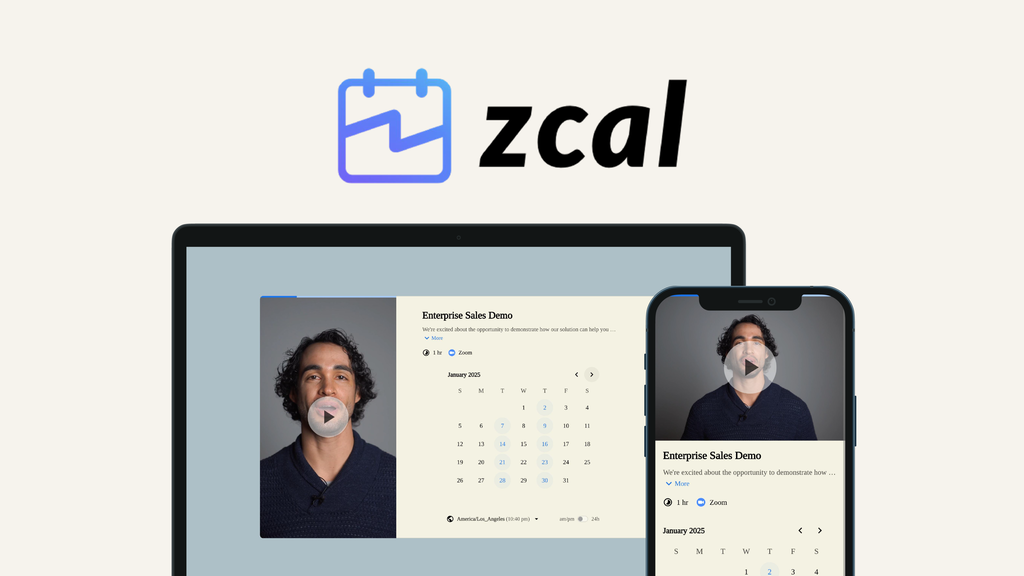
Its emphasis is presentation. Booking pages support custom fonts, colors, layouts, images, and video introductions. The same styling can carry through profile, cancellation, and rescheduling pages.
For teams, it supports collective scheduling, round-robin host assignment, and individual team-member bookings. AppSumo positions it as an alternative to Calendly, Acuity Scheduling, and Doodle.
One-time price: $59 for License Tier 1.
Other tiers: $139 for 10 users; $219 for 50 users.
Access: Lifetime access with all future Pro Plan updates.
Plan changes: If the Pro Plan name changes, the deal maps to the new plan name with accompanying updates.
Refund window: Up to 60 days after purchase.
Activation deadline: Within 60 days of purchase.
Purchase structure: Direct tier selection. No codes and no stacking.
Tier changes: Upgrade while the deal is available; downgrade within 60 days of purchase.
The $59 entry tier earns back its purchase price once the scheduling charges you actually avoid reach $59. Higher tiers need enough cancelled subscription spending to recover $139 or $219.
That makes Tier 1 the sensible starting point for a business with up to three users. The $252 original comparison price provides context, but your existing bill determines payback. Keeping both tools indefinitely removes the main financial reason to switch.
Use themed templates or create your own layouts with custom fonts, colors, and media. Website embedding is included, along with removal of zcal branding. This matters when your booking link is part of a sales or consulting workflow and should look consistent with your website.
Unlimited connected calendars help account for availability across work calendars. Collective scheduling shows times when everyone required is available. Round-robin scheduling distributes one-to-one meetings across hosts, reducing manual assignment work.
Set buffer times, minimum notice, meeting limits, and custom availability. Saved weekly schedules can be reused across booking links, while individual invites can have different hours. Multiple invitees can also book the same slot for classes, events, or webinars.
Custom questions collect information during booking. Video introductions let you explain who the client is meeting and what to expect. You can record directly in zcal or upload a file, and the included feature list specifies unlimited videos.
Automated, customizable email reminders are included. Every AppSumo tier also receives 750 SMS credits per account each month. Zapier connects booking activity to other applications, while Google Analytics and Meta Pixel integrations help track page activity and completed bookings.
Stripe integration supports paid appointments, and the included feature list specifies no commissions. Redirects after booking let you send clients to an appropriate next page. Zoom, Google Meet, and Microsoft Teams integrations support the meeting itself.
All three include Pro Plan features, teams, unlimited links, unlimited connected calendars, and the shared features described above. The user allowance increases; the monthly SMS pool stays at 750 credits across the base tiers.
The jump from Tier 2 to Tier 3 adds 40 users for another $80. That is useful for a larger active team, but unnecessary for unused seats.
You select a tier directly. The usual AppSumo code-stacking approach does not apply. The founder confirms that each account email can hold one AppSumo license; a second license requires a separate account and login.
Previous AppSumo buyers can upgrade their licenses, and the terms grandfather them into new features and feature limits.
Custom domains and sender emails cost extra. These require the Business Plan add-on, available for any license tier. Buying Tier 3 alone does not include them. The founder also confirms that default confirmation emails show the sender as Your Name (via zcal), so branding removal should not be confused with complete white-labeling.
SMS credits are shared and country-dependent. The Business add-on raises the monthly pool to 1,500 credits. Credits reset on the first of each month. When exhausted, SMS reminders pause until the next month, although email reminders continue.
Some workflows need closer inspection. A buyer reported problems with long-text field presentation and line breaks; the founder acknowledged potential improvements. Swedish was described as forthcoming in the supplied November 4, 2026 response, rather than already available.
These are the most useful checks before buying a lifetime deal for this particular tool:
zcal is a strong purchase candidate when its Pro features can replace an existing scheduling subscription. Tier 1 is the best default for up to three users. Higher tiers make sense for actual team demand, while custom domains and sender emails belong in a separate add-on decision.
The listing identifies a bootstrapped Houston company founded in November 2021, and founder updates document continued product development. That supports the case for considering it, without proving future survival. The trade-offs of lifetime deals still apply.
Two purchase-relative dates matter. Activate immediately after purchase, ahead of the 60-day activation deadline. Make the keep-or-refund decision by day fifty, leaving time within the 60-day refund window.
SAASTOOLY Rating: 4.5/5
Not sure yet?
Run this deal through our free scorecard. Seven checks, a payback calculator, and a plain verdict on whether to buy.
Get the Lifetime Deal Scorecard, free
Yes. It includes all future Pro Plan updates. If the plan name changes, the deal maps to the replacement name with accompanying updates.
No. Custom domains and custom sender emails require the Business Plan add-on, which can be added to any license tier.
Every base tier gets 750 monthly SMS credits per account, increasing to 1,500 with the Business add-on. The number of texts depends on the recipient’s country.
No. Each account email holds one AppSumo license. A second license needs a different email and separate login, and zcal has no account switcher.
Yes. You can connect both calendars to one account and choose the write calendar for each booking link. Alternatively, invite a second account to your team using an available seat.
You can upgrade between the three tiers while the deal is available. Downgrades are permitted within 60 days of purchase.

