Robomotion Lifetime Deal
Robomotion Lifetime Deal is a tool for robotic process automation that enables the automation of both web and desktop applications, enhancing your workflow efficiency.

Build a single place for team projects and client collaboration that keeps work moving daily
We may earn an affiliate commission if you purchase through our links, at no extra cost to you. Deal terms can change, so the current AppSumo listing is authoritative.
Recurring bills for team documentation, project management, and client portals can overlap. FuseBase combines those jobs in one workspace, with lifetime access starting at $69 against the listing’s $468 retail comparison price.
The strongest reason to consider it is an existing need for both internal collaboration and a client-facing workspace. Buying it only for occasional notes leaves much of the product unused. Buying it to consolidate documents, deliverables, and client updates gives it a clearer role. The decision comes down to whether its limits and setup requirements fit the work you already pay other software to handle.
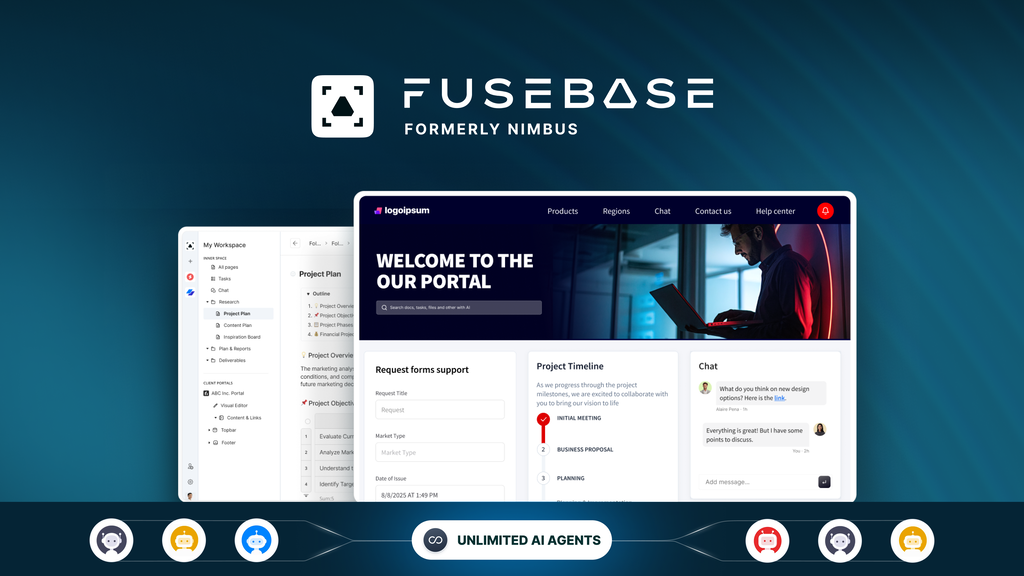
FuseBase, formerly Nimbus Note, combines internal workspaces with external client portals. Teams can organize knowledge, project records, and deliverables while giving clients a separate place to access shared material.
It also supports custom apps built using tools such as ChatGPT, Claude, and VS Code. APIs and MCP connect those apps with FuseBase content and modules.
Managed hosting for Paperclip, n8n, and Firecrawl extends the platform into automation and app development. That makes it relevant to both business operations software buyers and teams comfortable building their own workflows.
One-time price: Starts at $69 for one code.
Access: Lifetime access. This offer is exclusive to AppSumo Plus members.
Listed alternatives: Basecamp, Notion, and Replit.
Refund window: Refundable for up to 60 days.
Displayed plans: One, two, three, or four codes at $69, $138, $207, and $276.
Code stacking: The offer uses multiple codes. Reviews also describe larger stacks beyond the four displayed plans.
The $69 entry price is substantially below the listing’s $468 retail comparison. That is an upfront price comparison, rather than evidence of a particular monthly saving.
Payback depends on which subscription you can actually cancel. Keeping every existing tool makes this an additional expense. Moving an active documentation or client collaboration workflow into FuseBase gives the purchase a financial purpose. The practical question in a lifetime deal versus subscription comparison is whether the replacement covers your daily work.
Branded external portals can serve as client workspaces, deal rooms, or SEO-friendly sites. They support FuseBase Pages and Apps, permissions, and secure access. This matters if client files, feedback, and updates currently live across email and shared folders.
Drag-and-drop pages bring together documents, tables, PDFs, images, and embeds from tools such as Figma, Miro, and Looker Studio. Teams can keep project history and company knowledge close to the work clients receive.
AI can draft content, summarize documents, and find answers across workspace material. Agents, automation credits, and transcription allowances add capacity for recurring tasks, subject to each plan’s limits.
Frontend and full-stack apps let you extend the workspace. The listing supports building through existing AI subscriptions rather than buying separate AI tokens for that development workflow. APIs and MCP provide connections to FuseBase modules.
FuseBase handles hosting, maintenance, and updates for Paperclip, n8n, and Firecrawl. These tools can connect with workspaces, pages, and portals through APIs and MCP, reducing the infrastructure work involved in running them separately.
The four displayed plans have the following allocations.
| Limit | 1 code | 2 codes | 3 codes | 4 codes |
|---|---|---|---|---|
| One-time price | $69 | $138 | $207 | $276 |
| Users | 1 | 3 | 10 | 12 |
| Workspaces | 50 | 100 | 200 | 250 |
| Client portals | 1 | 5 | 15 | 20 |
| Client accounts | 5 | 25 | 75 | 100 |
| Frontend apps | 5 | 10 | 15 | 20 |
| Active full-stack apps | 1 | 2 | 3 | 4 |
| Storage | 50 GB | 100 GB | 400 GB | 450 GB |
| OCR records | 1,500 | 3,000 | 6,000 | 7,000 |
| AI agents | 5 | 8 | 20 | 25 |
| Transcription hours monthly | 5 | 10 | 25 | 30 |
| AI automation credits monthly | 1,000 | 5,000 | 15,000 | 20,000 |
| AI requests monthly | 1,000 | 2,500 | 10,000 | 15,000 |
These limits do not rise evenly. Moving from two to three codes increases users from three to ten and storage from 100 GB to 400 GB. Moving from three to four adds two users and 50 GB.
This is a code-based offer. Customer reviews mention stacking beyond ten codes, but the displayed comparison covers four plans. Confirm the resulting allocation before purchasing a larger stack. Our guide to AppSumo code stacking explains the purchasing mechanics.
Setup takes time. Positive reviews acknowledge a learning curve, particularly when configuring portals, automation, and custom apps. One reviewer also reports unreliable documentation links.
Live onboarding deserves scrutiny. Several reviewers report canceled or missed demo calls. The founder says demos primarily support sales and directs users toward Discord, AI support, email, and YouTube. Another reviewer reports quick support replies, so the feedback is mixed.
Client and AI limits can bind early. One code includes five client accounts and one portal. Higher-volume collaboration or automation requires checking several allowances, rather than choosing solely by storage.
These are useful checks before buying a lifetime deal because they test whether the software can replace an existing workflow.
A good fit for:
Consider alternatives if you are:
FuseBase is worth considering when client collaboration and internal knowledge management are both active needs. The three-code plan makes a substantial jump in users, storage, and AI allowances, but the right purchase is the smallest allocation that covers your actual workload.
The support complaints deserve attention. Positive software reviews do not erase missed onboarding calls, and lifetime access does not establish whether the vendor will meet your needs three years from now. Use the 60-day refund window to evaluate a real workflow.
Redeem your codes immediately after purchase. Set your keep-or-refund decision for day fifty, leaving time before the 60-day refund window closes.
Not sure yet? Run this deal through our free scorecard. Seven checks, a payback calculator, and a plain verdict on whether to buy. Get the Lifetime Deal Scorecard, free
Yes. The displayed plans provide lifetime access, starting at $69 for one code.
Yes. This offer is listed as exclusive to AppSumo Plus members.
One code includes one client portal and five client accounts. It also includes one internal user and 50 workspaces.
Yes. The listing displays one- through four-code plans, and customer reviews describe larger stacks. Confirm the allocation for any purchase beyond the displayed comparison.
The listing names Paperclip, n8n, and Firecrawl. FuseBase handles their hosting, maintenance, and updates.
The purchase is refundable for up to 60 days and covered by AppSumo’s We Got Your Back guarantee.