Short Description
Turn presentation questions into clear answers and qualified leads during and after your talk
Meta title
PresEngage Lifetime Deal - AI Presentation Q&A
Meta description
PresEngage starts at $69 for lifetime access to AI presentation Q&A, unlimited audiences, multilingual answers, and attendee follow-up.
Target keywords
PresEngage lifetime deal, PresEngage review, AI presentation Q&A, audience engagement software, presentation lead capture
We may earn an affiliate commission if you purchase through this page, at no extra cost to you. Deal terms can change; the current AppSumo listing is authoritative.
Opening
A recurring webinar or audience-engagement bill is the expense to examine here. PresEngage lists ON24 as an alternative and shows a $360 comparison price against its $69 entry tier. That comparison price has no billing period attached, so it does not establish an annual saving.
The practical question is whether you pay for presentation Q&A, attendee capture, or follow-up that PresEngage could take over. It gives attendees a way to ask questions privately and keeps answering after your talk. It could replace part of your engagement workflow, provided those are the jobs behind your current subscription.
What it is
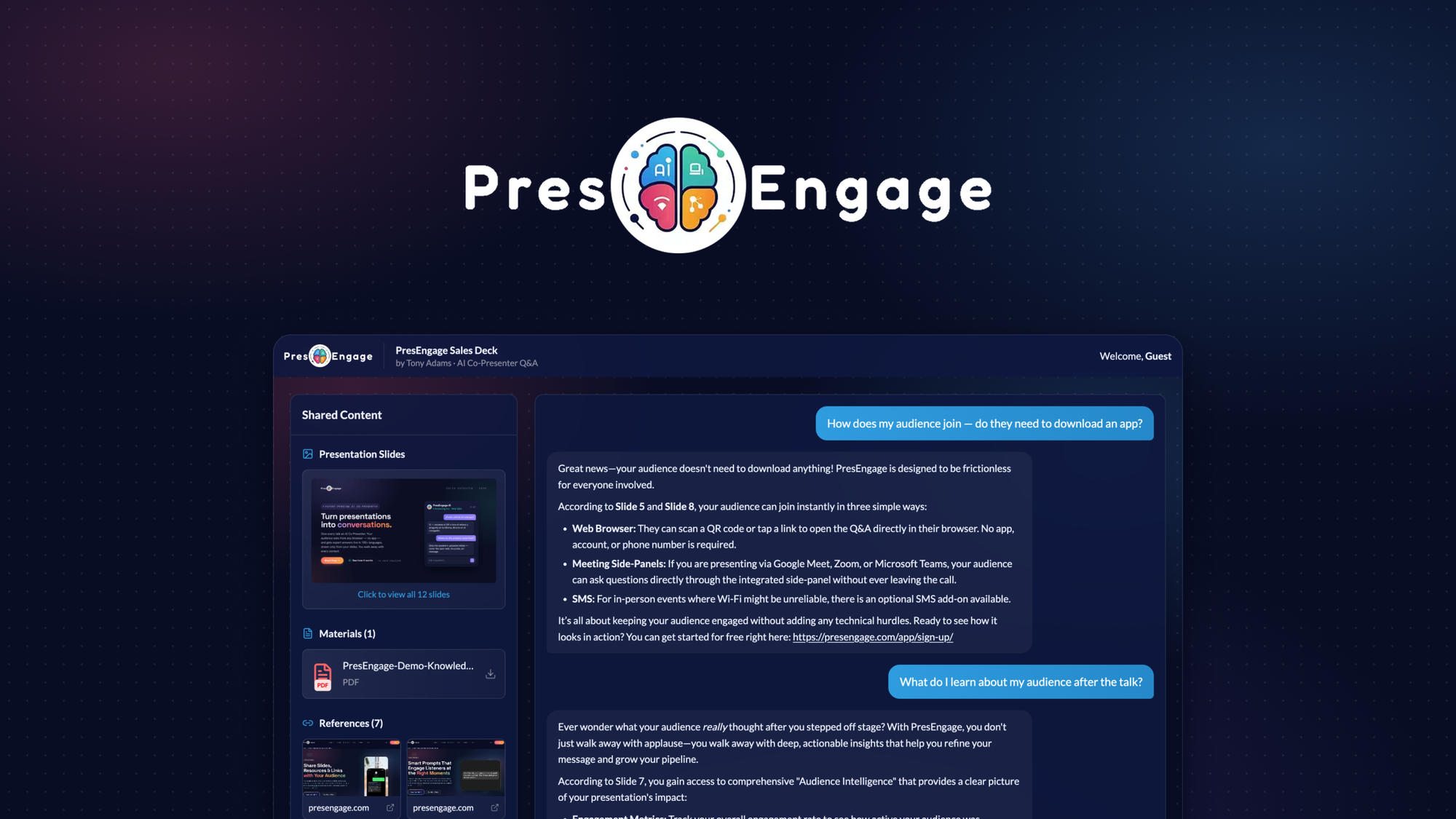
PresEngage turns an uploaded presentation PDF into an AI assistant for your audience. It analyzes slide text and visuals, including charts, diagrams, and pricing tables. Answers reference the slides they come from.
Attendees join through a browser link or the Zoom and Google Meet side panels. They do not need an app or account. Questions can be asked in more than 100 languages, and questions the deck cannot answer are flagged for the presenter.
The tool also captures attendee contacts, records their interests, and supports follow-up. That makes it relevant to sales presentations, coaching sessions, and talks where the conversation should continue afterward.
Key facts
One-time price: License Tier 1 costs $69. License Tier 2 costs $139.
Access: Lifetime access.
Comparison price: The listing displays $360 alongside Tier 1.
Listed alternative: ON24.
Refund window: Refundable for up to 60 days.
Tier structure: Two directly selectable license tiers.
Shared capacity: Both displayed tiers include one presenter seat, one workspace, unlimited presentations, and unlimited audience members.
Integrations: Google Meet, Zoom, and Zapier. The listing also describes connecting tools through your own API key.
What the payback looks like
The $360 comparison price is higher than either lifetime tier, but it is not identified as a monthly or annual charge.
Payback therefore depends on the subscription you can actually cancel. Against that bill, recovery within six months is excellent. Six to twelve months is reasonable for weekly use; twelve to eighteen months requires PresEngage to be central to your work. Beyond that, vendor longevity carries more weight.
The lifetime deal versus subscription comparison is useful here. If this becomes another tool alongside your existing subscription, there is no subscription payback.
What you actually get
Answer questions without stopping the presentation
The AI handles audience questions using your content and provides slide citations. You can adjust its personality and response style, then run a private Test Q&A before presenting. This gives you a chance to spot content gaps before attendees encounter them.
Include people who would otherwise stay quiet
Attendees can ask privately in their own language. Questions are anonymous to other attendees, though the presenter can identify participants. Smart prompts can encourage a first question after a chosen period of inactivity.
Capture interest for sales follow-up
PresEngage records everyone who joins as a contact, along with what they wanted to know. Calls to action can direct participants toward booking a demo or another next step. Zapier supports transferring that information into your CRM workflow.
Learn where the presentation missed
Audience intelligence tracks themes, top questions, and sentiment. An AI summary identifies where your message did not land. For repeated pitches or training sessions, this can help you revise material using actual audience questions.
Keep the conversation going afterward
The assistant continues answering after the presentation. Smart follow-up sends personalized messages to participants, extending the usefulness of the deck beyond the live session.
Tiers and limits
License Tier 1: $69 for lifetime access
The displayed feature list includes:
- One presenter seat and one workspace.
- Unlimited presentations and audience members.
- AI Q&A in more than 100 languages.
- Audience intelligence analytics, smart follow-up, and smart prompt.
- QR code engagement, digital wallet, and custom domain.
License Tier 2: $139 for lifetime access
The displayed Tier 2 list repeats those features and the same seat, workspace, presentation, and audience limits. The founder’s description specifically highlights branded QR codes and Digital Wallet passes for Tier 2.
The visible tier comparison does not show an increase in presenter seats or workspaces. Verify the branding and wallet functionality you need before paying more.
This deal uses direct tier selection. A buy-entry-and-stack-later strategy is not established by the listing. Our guide to AppSumo codes and stacking explains why that distinction matters.
Things to weigh
The AI is bounded by your material. Questions your deck cannot answer are flagged for you. That keeps the response scope focused, but someone still needs to handle unresolved questions.
Both tiers show a single presenter and workspace. Unlimited audiences do not establish support for a multi-presenter organization.
The company is young. The listing gives an October 2, 2025 founding date and describes a bootstrapped startup with 1–10 people. Long-term availability matters when purchasing lifetime access; the pros and cons of lifetime deals cover that trade-off.
Before you buy
- Check your real presentation content. Confirm that your PDF’s charts, diagrams, and pricing tables are handled adequately through the available demo or Test Q&A workflow.
- Confirm the meeting workflow. Check how attendees access PresEngage through the Zoom or Google Meet side panel in your setup.
- Check your CRM connection. Verify that the Zapier workflow or API connection carries the attendee details and question history your follow-up process needs.
- Confirm the tier-specific branding. Establish which tier provides your required QR code, Digital Wallet, and custom-domain setup.
These are practical checks before buying a lifetime deal, especially when replacing an existing workflow.
Who it suits, and who should look elsewhere
Who it suits
- Sales managers presenting decks and collecting prospect questions.
- Coaches who want multilingual Q&A during and after sessions.
- Solo presenters who need contact capture and personalized follow-up.
- Speakers addressing audiences reluctant to ask questions publicly.
Who should look elsewhere
- Teams needing multiple presenter seats or workspaces may be better served by a subscription explicitly supporting those requirements.
- Buyers who need a complete webinar platform replacement should assess their wider requirements separately.
- Presenters expecting answers beyond their supplied content need a different approach.
Verdict
Tier 1 is the sensible starting point for a single presenter whose main needs are deck-based Q&A, attendee capture, and follow-up. Its $69 price is easier to justify when those functions replace a paid service you already use.
Tier 2 deserves consideration when its branded QR and Digital Wallet offering matters to your events. The displayed limits give no reason to purchase it for more presenters or workspaces.
Activate and evaluate promptly after purchase. Make your keep-or-refund decision by day fifty, leaving time within the stated 60-day refund window. Our AppSumo refund policy guide provides context for that decision.
Not sure yet?
Run this deal through our free scorecard. Seven checks, a payback calculator, and a plain verdict on whether to buy.
Get the Lifetime Deal Scorecard, free
FAQ
How much does PresEngage cost?
License Tier 1 costs $69, and License Tier 2 costs $139. Both are offered with lifetime access.
Are presentations and audience members unlimited?
Yes. Both displayed tiers include unlimited presentations and unlimited audience members, with one presenter seat and one workspace.
Do attendees need an account or app?
No. They can join through a browser link or the Zoom and Google Meet side panels without an app or account.
Where do the AI’s answers come from?
Answers come from your supplied content and include slide citations. Questions the deck cannot answer are flagged in the Messaging Center.
Can PresEngage send attendee information to a CRM?
The listing describes capturing attendee contacts and interests, with connections through Zapier or your own API key.
What is the refund window?
The purchase is refundable for up to 60 days. The listing also states that Plus members are covered by AppSumo’s We Got Your Back guarantee.