About
Find the apps slowing your Mac so you can reclaim memory and keep daily work running smoothly
Disclosure: We may earn an affiliate commission if you purchase through our links, at no extra cost to you. Deal terms can change; the current AppSumo listing is authoritative.
A small purchase, rather than a proven subscription saving
There is no documented recurring bill or annual subscription cost to cancel here. Vitals replaces the workflow of sorting through Activity Monitor’s process list, which already comes with your Mac. The listing displays a $39 comparison price, a $15 price, and a promotional $12 lifetime price for one Mac.
The purchase makes sense if finding resource-heavy apps takes too much time. Vitals groups helper processes under their parent apps and retains usage history. As with any lifetime deal versus subscription decision, separate the convenience you want from savings the source actually supports.
What it is
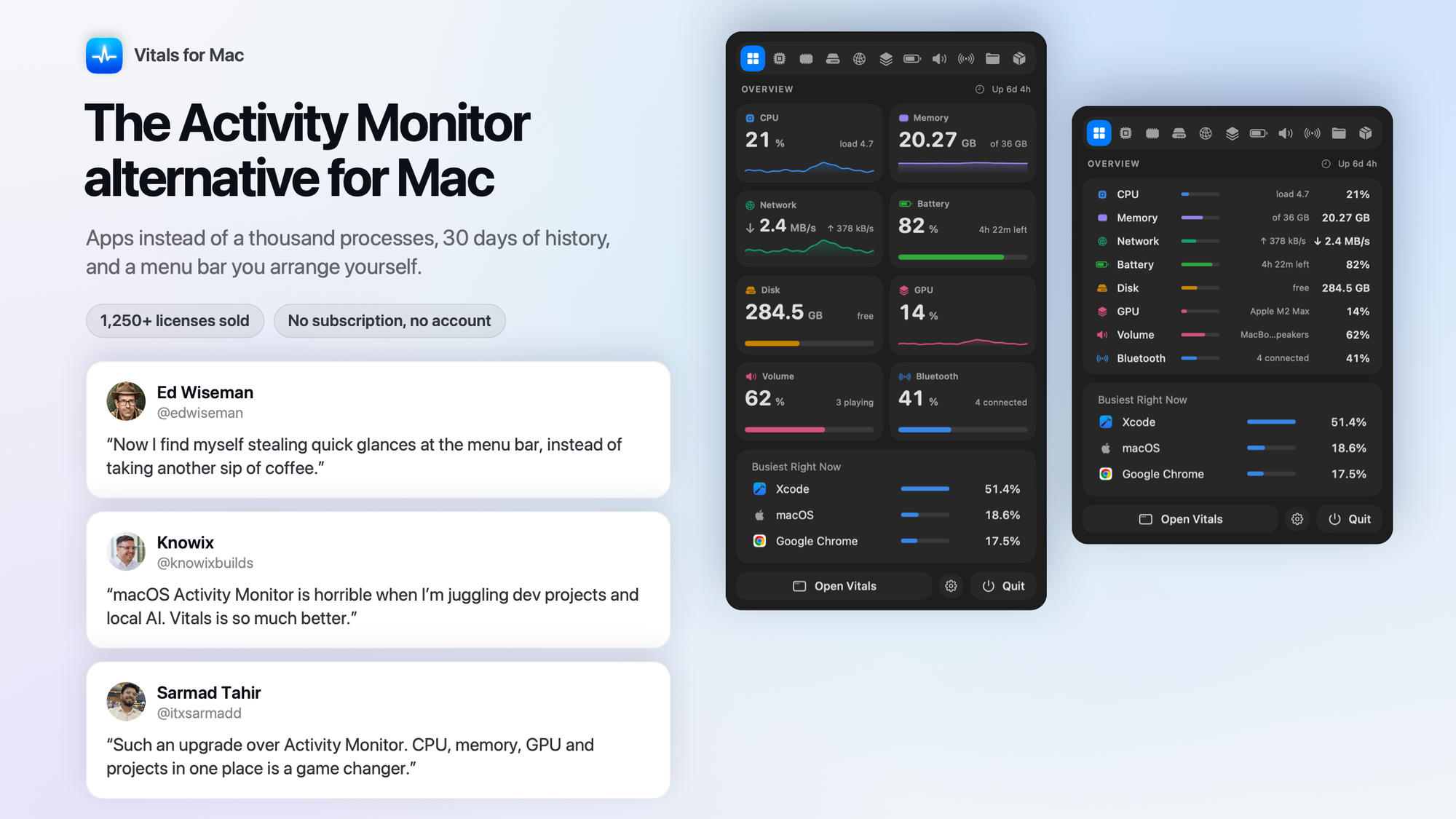
Vitals is a native Mac monitoring app. It groups processes by the application that launched them, giving you an app-level view of memory, CPU, energy, disk, and network use.
That grouping helps answer a practical question: which app is making the Mac hot or slow? For supported browsers, you can look further into tabs, extensions, and graphics work.
It also covers several adjacent jobs, including per-app volume control, Bluetooth battery monitoring, Docker container monitoring, and finding forgotten development servers. The listing says information about what you run stays on your Mac.
Key facts
One-time price: Promotional pricing starts at $12 for one Mac.
Access: Lifetime access, every feature, and lifetime updates.
Replaces: Activity Monitor’s process-first workflow.
Refund window: Refundable for up to 60 days.
Plans: One, two, three, or four Macs.
Compatibility: Apple silicon and Intel Macs running macOS 15 or later.
License transfer: You can move your license to a new Mac at any time.
Languages: Eleven, including English, German, French, Spanish, and Japanese.
The AppSumo refund policy guide provides useful context for assessing the purchase during that refund window.
What the payback looks like
There is no supported monthly-cost comparison, so a financial payback period cannot be calculated from this listing. Buying Vitals instead of using Activity Monitor adds a cost.
The practical return is less time spent tracing memory use, finding idle servers, or investigating battery drain. At $12 for one Mac, it is a modest convenience purchase for frequent troubleshooting. It is less compelling if you rarely need these answers.
What you actually get
Find the app responsible
Vitals adds helper processes to the app that launched them. The listing describes roughly 60 apps on screen rather than around 1,000 processes. That reduces manual adding and makes resource use easier to attribute.
Browser detail supports Chrome, Safari, Firefox, Edge, Brave, and Arc.
Investigate problems after they happen
Thirty days of history lets you investigate overnight battery drain or memory growth while you were away. Notifications can alert you when an app misbehaves.
You can quit an app or an individual process, including force quitting, after confirmation.
Clear out forgotten development workloads
Development servers are grouped by project with their ports, and an idle server can be stopped in one click. Docker containers appear by name with their memory and CPU use.
This makes Vitals relevant to people browsing development and IT tools who regularly leave local workloads running.
Manage sound and battery visibility
Per-app volume sliders let you lower one application while leaving another louder. Bluetooth batteries appear together, lowest first, with separate readings for AirPods’ left earbud, right earbud, and case.
Vitals also identifies what keeps the Mac awake and which apps draw the most power.
Let coding assistants query local activity
The founder says Vitals 1.4 ships an MCP server for compatible assistants, including Claude, Claude Code, Codex, and Cursor. Assistants can ask about running apps, ports, and historical activity.
According to that update, quit requests require your approval in a Vitals window. You choose what assistants may see. Other parts of the listing still describe MCP as forthcoming, so confirm its current availability.
Tiers and limits
The displayed promotional plans are:
- 1 Mac: $12, with $15 also shown.
- 2 Macs: $24, with $30 also shown.
- 3 Macs: $36, with $45 also shown.
- 4 Macs: $48, with $60 also shown.
Each plan includes every feature and lifetime updates. The limit that increases is the number of Macs covered; higher plans do not add exclusive functionality.
The page presents selectable plans and labels the entry purchase “1 Code.” Choose the Mac coverage you need rather than assuming codes can be combined later. The guide to AppSumo code stacking explains why stacking should not be inferred from a code label alone.
Things to weigh
Your operating system matters. Vitals requires macOS 15 or later. It does not cover a Windows or mixed-platform fleet.
The MCP wording needs confirmation. The overview says it is coming soon, while the founder says version 1.4 includes it. Treat the installed version’s availability as a purchase check.
The business is young. The listing gives a September 24, 2026 founding date and describes a solo builder behind a bootstrapped startup. Lifetime updates are included, but that promise cannot establish whether the business will still be operating in three years. This is one of the central trade-offs of lifetime deals.
Before you buy
- Verify that every Mac you want covered runs macOS 15 or later.
- Confirm the required number of Macs before selecting a plan.
- Check that MCP is available in the current release if assistant access is important.
- During the refund window, assess whether app grouping, browser detail, and server monitoring answer your actual troubleshooting questions.
Who it suits, and who should look elsewhere
Good candidates
- Developers managing local servers and Docker containers.
- Freelancers who frequently investigate slowdowns or battery drain.
- Mac users who want app-level totals and historical context.
Better served elsewhere
- Occasional troubleshooters who are satisfied with Activity Monitor.
- Users whose Macs cannot run macOS 15 or later.
- Teams seeking an ongoing subscription for centralized, cross-platform monitoring rather than a local Mac utility.
Verdict
Vitals looks like a sensible low-cost purchase for Mac users who repeatedly spend time identifying resource-heavy apps. App grouping, history, and development-server visibility justify consideration without pretending this automatically cancels a subscription.
Choose it for the functionality available today. Lifetime updates are welcome, but they are not proof of future vendor survival. The MCP inconsistency deserves confirmation before assistant integration becomes your main reason to purchase.
Two dates should guide the purchase: purchase day, when you should redeem promptly, and day fifty, when you should decide whether to keep it while the 60-day refund window remains open.
SAASTOOLY Rating: 4.5/5
Not sure yet? Run this deal through our free scorecard. Seven checks, a payback calculator, and a plain verdict on whether to buy. Get the Lifetime Deal Scorecard, free
FAQ
Is Vitals a lifetime purchase?
Yes. The listing includes lifetime access and lifetime updates across all four plans.
Does it work on Intel Macs?
Yes. Both Intel and Apple silicon Macs are supported, with macOS 15 or later required.
Do higher plans include more features?
No. Every plan includes every feature. Higher plans increase the number of Macs covered.
How much history does it retain?
Vitals keeps 30 days of history for investigating past resource use and battery drain.
Can a coding assistant quit apps without approval?
The founder’s Vitals 1.4 description says no. Vitals displays the assistant’s request, and nothing is quit until you approve it.
Can I transfer the license or request a refund?
You can move your license to a new Mac at any time. The listing also provides a refund window of up to 60 days.